

Quotex Platform Overview — Complete Feature Guide
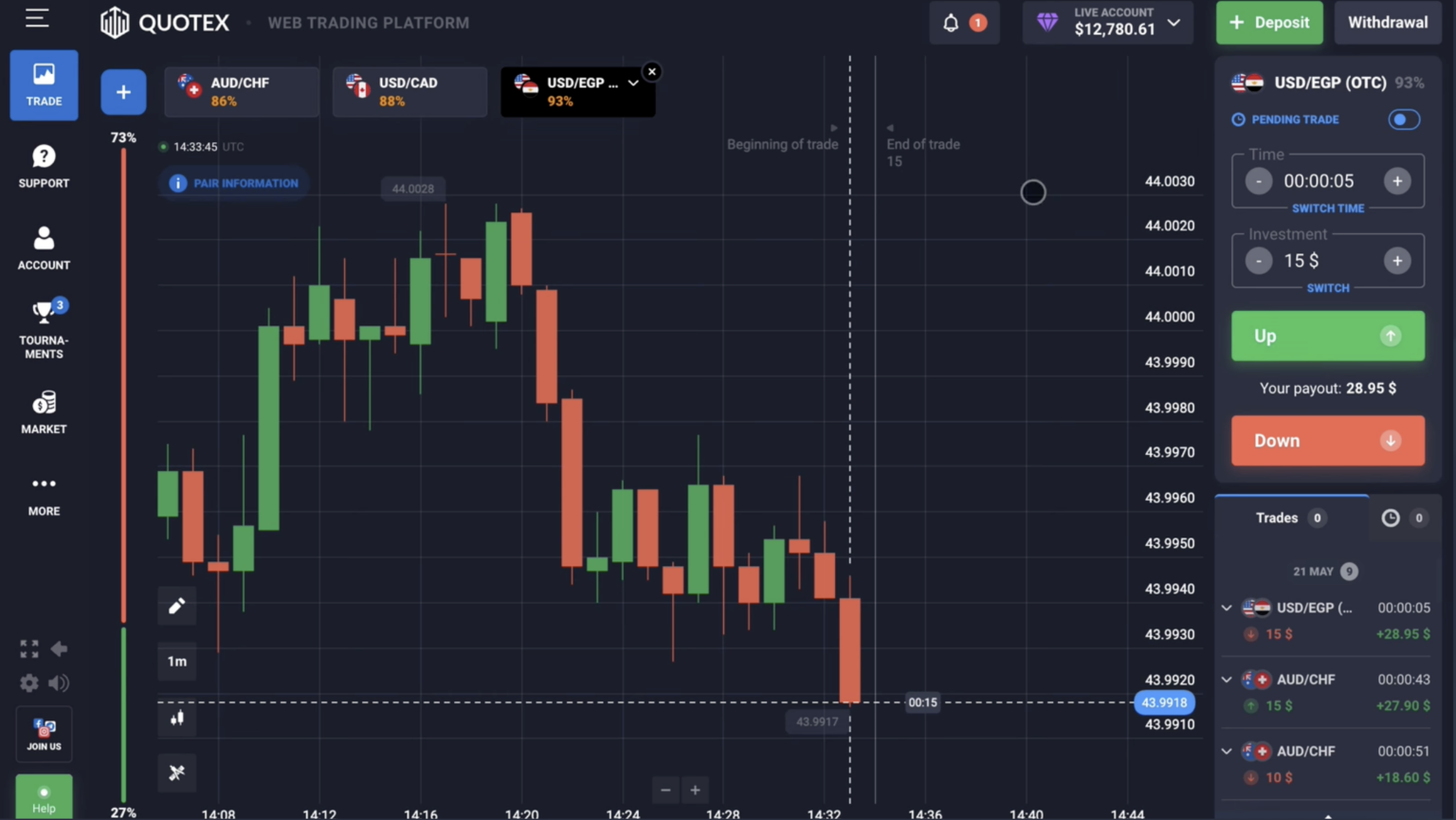
The Trading Chart
The main trading interface centers on the price chart with these key components: (1) Asset selector (top-left) — choose from 400+ trading instruments; (2) Timeframe selector — 5 seconds to 1 day chart timeframes; (3) Chart type — candlesticks (default), line, bars, Heikin-Ashi; (4) Drawing tools — trendlines, horizontal lines, Fibonacci retracements, channels, text annotations; (5) Indicator library — 100+ technical indicators; (6) Save chart layout — store your indicator/drawing setup for one-click reload.
Account Dashboard
Top-right area shows your account information at a glance:
- Account balance (real money in your account, USD)
- Demo/Live switcher (toggle between $10,000 virtual demo and your real account)
- Deposit button (green, top right)
- Withdrawal button (in Profile menu)
- Profile/Settings access
- Language switcher (15+ languages supported)
- VIP tier indicator (Standard/Pro/VIP)
- 2FA status and security settings
Trading Window
Right side of screen has the trading panel:
- Stake amount input (minimum $1, configurable up to platform limits)
- Expiry duration selector (5 sec to 4 hours for binary; some assets up to 24h)
- Payout percentage display (live updating, varies 75-98% based on asset/time)
- Direction buttons: green up-arrow (CALL/UP), red down-arrow (PUT/DOWN)
- Estimated win amount preview before clicking
- Active trades counter (you can have multiple concurrent trades)
Indicator Library
Quotex includes 100+ technical indicators across categories: trend (moving averages, MACD), momentum (RSI, Stochastic), volatility (Bollinger Bands, ATR), volume (Volume bars, OBV), and complex (Ichimoku, Elliott Wave assistant). Adding indicators:
- Click 'Indicators' icon at top of chart
- Browse or search by name
- Click indicator to add with default settings
- Click the gear icon next to added indicator name to customize
Asset Selector
| Category | Count on Quotex | Trading Hours |
|---|---|---|
| Forex (currency pairs) | 50+ | 24/5 (Mon 22:00 UTC to Fri 22:00 UTC) |
| Cryptocurrencies | 20+ | 24/7 |
| Commodities (Gold, Silver, Oil, Gas) | 8+ | 23/5 with daily 1h break |
| Stock Indices (S&P 500, Nasdaq, DAX) | 8+ | During respective exchange hours |
| Individual Stocks (Apple, Tesla, etc.) | 50+ | During US/EU exchange hours |
| OTC pairs | 20+ | 24/7 — synthetic versions of major pairs |
Expiry Options
| Expiry Type | Duration Options | Best For |
|---|---|---|
| Quick Deal | 5s, 15s, 30s, 60s | Scalping (advanced traders only) |
| Short binary | 5 min, 10 min, 15 min | Day trading |
| Medium binary | 30 min, 1h, 2h | Swing trading on 15m-1h charts |
| Long binary | 4h, 1 day | Position trading |
Mobile App vs Desktop
Quotex offers Android, iOS, and desktop (web browser) interfaces with feature parity.
| Feature | Desktop | Mobile |
|---|---|---|
| Chart size and clarity | Larger, easier to read | Smaller, requires zoom |
| Multi-monitor support | Yes | No |
| Indicator visibility | Easier to see multiple indicators | Limited screen real estate |
| Speed of execution | Mouse click | Tap (slightly slower) |
| Push notifications | Browser permissions | Native iOS/Android notifications |
| Biometric login | No | Yes (Face ID, fingerprint) |
| Best for | Strategy development, multi-asset monitoring | Mobile trading, notifications, deposit/withdrawal |
Keyboard Shortcuts (Desktop)
- Spacebar — toggle Buy/Sell selection
- Enter — confirm and place trade
- ↑/↓ — adjust stake amount
- ←/→ — adjust expiry duration
- S — save chart layout
- I — open indicator library
- Ctrl+1 to Ctrl+9 — switch between saved chart layouts
Platform FAQ
Is the platform the same on demo and live?
Yes — identical features, identical charts, identical payouts. Only difference is balance type (virtual vs real). Switch between via top-right balance dropdown.
Can I have demo and live open simultaneously?
Single browser tab can show one account at a time, but you can use two browser tabs or one mobile + one desktop to monitor both. Useful when testing new strategies on demo while live trading proven strategies.
Does Quotex have API for algorithmic trading?
No — Quotex doesn't provide trading API. Manual trading only. If you need algorithmic trading on binary options, consider Deriv (which supports MT5 with EAs) instead. Quotex is optimized for manual discretionary trading.
Can I export trade history?
Yes — Profile → Trade History → Export CSV. Download includes every trade with timestamps, amounts, outcomes. Useful for journaling and tax record-keeping.
What if the platform freezes during a trade?
Rare but happens. Quotex typically honors trades that were initiated even if platform issues prevented completion display. If you experience a stuck trade, contact support immediately with timestamp and asset details — they can verify and credit appropriately.
Are the price feeds the same as other platforms?
Quotex uses major liquidity provider feeds (Reuters, Bloomberg, exchange direct feeds) for real markets. OTC pairs use Quotex's pricing engine based on related real markets. Real-asset prices should match TradingView, MetaTrader, and other platforms within tenths of a pip. OTC prices may differ slightly from real-asset prices since they're synthetic.
Quotex
Divulgación: los enlaces de registro en esta página pueden generarnos una comisión sin coste adicional para usted. Esto no afecta la precisión editorial.